How to Earn (and Spend) Points on Kagodora Your points balance is the heart of the Kagodora ecosystem. Points are managed by myCRED and can be earned through many activities – from reading messages and uploading images to writing journal entries, building calendars, and participating in surveys. Points can also be spent on broadcasts, image uploads, social posts, and more. Below is the complete list of all point‑earning and point‑spending actions currently available. 📈 Earning Points Action Points Awarded How to Do It Welcome bonus +100 Automatically awarded when you register…
Kagodora Points Activity Shortcode Overview The shortcode gives members a clear, concise history of their points earnings and spendings that come directly from using the messaging and broadcast features of the Kagodora Engagement Suite. It displays the two most recent point transactions related to reading messages, sending broadcasts, and receiving “helpful” votes on their messages. This shortcode is designed to sit alongside your existing myCRED wallet (which shows the total balance) and provides context for how that balance has changed through recent messaging activity. How It Works The shortcode queries…
The Kagodora Engagement Suit is now error free and functional Ray 2047 AhDo 6:20 May 15 7:24pm The Kagodora Engagement Suit is now error free and functional. After hours of trouble shooting removing the nasa api notification and setting up the email page to establish a url seemed to correct the error in the plugin that was not allowing the website to save changes or refresh without dislaying double email errors. Kagodora Engagement Suite – Plugin Description Purpose The Kagodora Engagement Suite transforms your WordPress site into a fully…
Core Framework: Kagodora Engagement & Notification Suite Ray 2047 AhDo 3:83 (start) Membership engagement is key to keeping the kagodora growing designing a notification system that both tracts site activity and categorizes it fro display and distribution to members is the plan to procure, cultivate and maintain membership activity. Adding a membership message box or display board that notifies the member like the wallets displays points will also need to be created and added o the current code. Core Framework: Kagodora Engagement & Notification Suite We will build a single…
The code script has been updated What changed Now both mathor.ca (standalone) and the WordPress Kagodora plugin use identical time calculations. The next step is to ensure the Node.js app (the original) also matches; but for the PHP‑based mathor.ca, this update makes it consistent with your WordPress site.
Updating Mathor.ca with the Lates version of Kagodora Ray 2047 3:16 – May 15 1:46 Many updates have been implemented here at Kagodora.com and its time to update the time sequence so that its format can be copied to other sites like Bakaee.com that is next up on the schedule for updating and connecting to the kagodora network.
After many hours of building plugins including a PWA for the kagodora, a popup disclaimer for the PWA tracker we built we finally got technical aid from the programer who got the app back up and is also promising to zip the website up so I can gain access to the original code and begin to work on the interrogations that will synchronize the old with the new code and upgrade the current app available on apple and google.
After flushing the cach did not work we disconnected it all together and turns out lite speed could not catch the code and stop it from running. Instructions for Safari or Google (may work the same on other browsers) 1. Go to kagodora.com 2. If the browser prompts you to download the website to your home screen then follow the instructions. 3. If the browser does not prompt you to download the website to your home screen then go to the top right and click the 3 dots and…

 How to Earn (and Spend) Points on Kagodora Your points balance is the heart of the Kagodora ecosystem. Points are managed by myCRED and can be earned through many activities – from reading messages and uploading images to writing journal entries, building calendars, and participating in surveys. Points can also be spent on broadcasts, image uploads, social posts, and more. Below is the complete list of all point‑earning and point‑spending actions currently available. 📈 Earning Points Action Points Awarded How to Do It Welcome bonus +100 Automatically awarded when you register…
 Kagodora Points Activity Shortcode Overview The shortcode gives members a clear, concise history of their points earnings and spendings that come directly from using the messaging and broadcast features of the Kagodora Engagement Suite. It displays the two most recent point transactions related to reading messages, sending broadcasts, and receiving “helpful” votes on their messages. This shortcode is designed to sit alongside your existing myCRED wallet (which shows the total balance) and provides context for how that balance has changed through recent messaging activity. How It Works The shortcode queries…
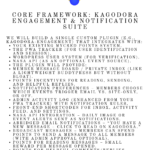 Core Framework: Kagodora Engagement & Notification Suite Ray 2047 AhDo 3:83 (start) Membership engagement is key to keeping the kagodora growing designing a notification system that both tracts site activity and categorizes it fro display and distribution to members is the plan to procure, cultivate and maintain membership activity. Adding a membership message box or display board that notifies the member like the wallets displays points will also need to be created and added o the current code. Core Framework: Kagodora Engagement & Notification Suite We will build a single…
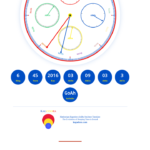 The code script has been updated What changed Now both mathor.ca (standalone) and the WordPress Kagodora plugin use identical time calculations. The next step is to ensure the Node.js app (the original) also matches; but for the PHP‑based mathor.ca, this update makes it consistent with your WordPress site.
 Updating Mathor.ca with the Lates version of Kagodora Ray 2047 3:16 – May 15 1:46 Many updates have been implemented here at Kagodora.com and its time to update the time sequence so that its format can be copied to other sites like Bakaee.com that is next up on the schedule for updating and connecting to the kagodora network.
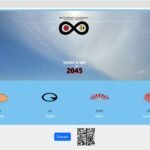 After many hours of building plugins including a PWA for the kagodora, a popup disclaimer for the PWA tracker we built we finally got technical aid from the programer who got the app back up and is also promising to zip the website up so I can gain access to the original code and begin to work on the interrogations that will synchronize the old with the new code and upgrade the current app available on apple and google.
 After flushing the cach did not work we disconnected it all together and turns out lite speed could not catch the code and stop it from running. Instructions for Safari or Google (may work the same on other browsers) 1. Go to kagodora.com 2. If the browser prompts you to download the website to your home screen then follow the instructions. 3. If the browser does not prompt you to download the website to your home screen then go to the top right and click the 3 dots and…